How to Use Choice Boards to Support Communication and Independence
Practical choice boards that help learners express preferences, access activities, and participate in meaningful everyday decisions.
By Adaptive Strides Editorial Team · October 21, 2026 · Approximately 7-minute read
Giving learners a meaningful voice
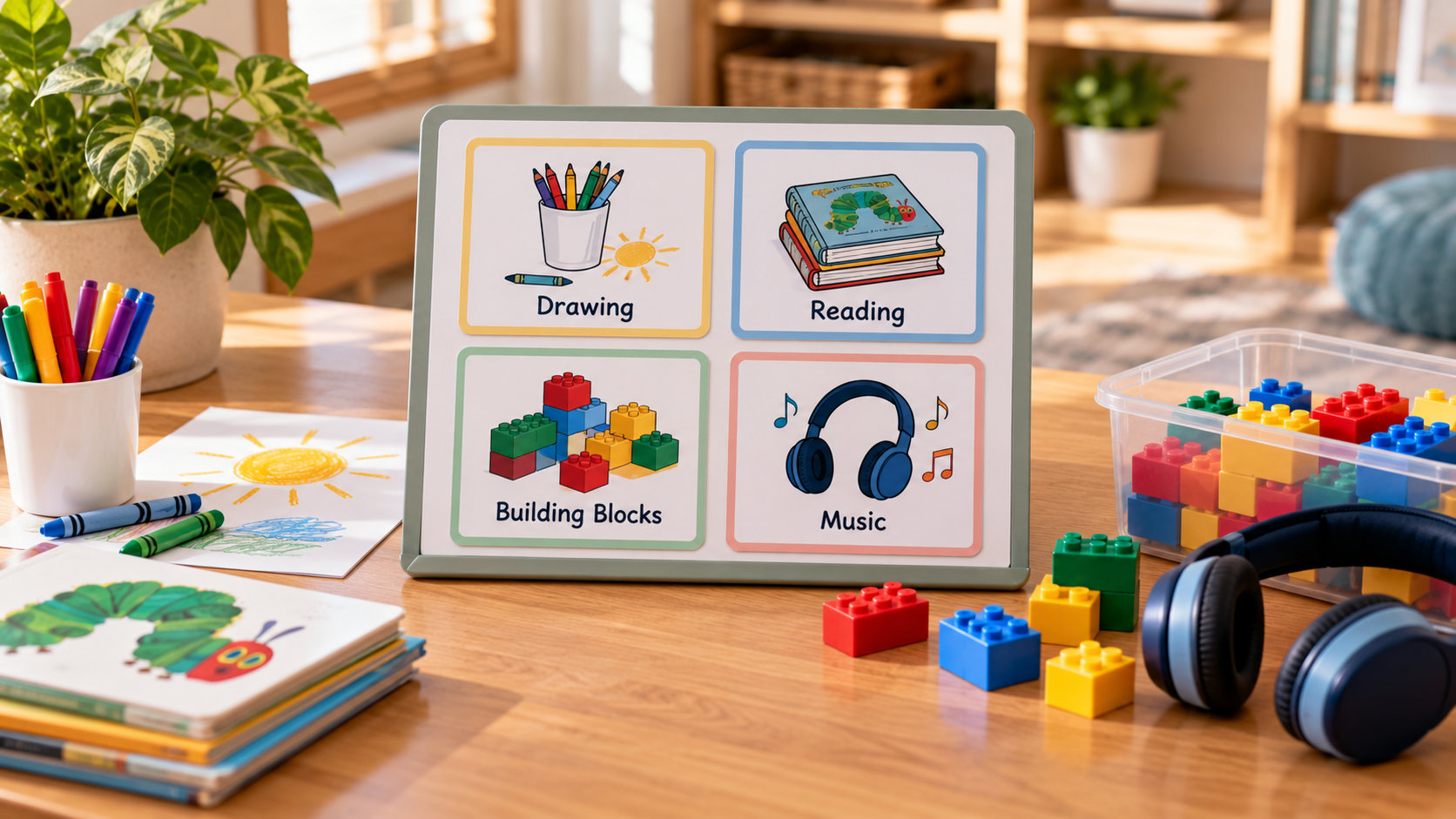
During free time, an educator asks a child what they would like to do. The child has a clear preference but cannot easily communicate it through speech. When the educator presents pictures of drawing, books, blocks, and music, the child points to drawing. The educator brings out the crayons, and the activity begins. A choice board can make everyday options easier to understand and express. Its purpose is not to secure cooperation with an adult’s plan. It is to help someone communicate a genuine decision and participate in what happens next.
What is a choice board?
A choice board displays available options using photographs, symbols, illustrations, written words, or another accessible representation. A learner might choose by pointing, looking toward an option, speaking, gesturing, using a switch, or selecting a symbol on an AAC device. Boards can support decisions about activities, materials, clothing, food, and routines. The right format depends on the person—not simply their age or diagnosis. A board also has limits: someone can ask for something not pictured, change their mind, or say no. Choice boards are one communication support, not a replacement for broader communication access.
Three accessible choice-board formats
- Read a chapter
- Listen to music
- Sketch
- Take a walk
Why choice boards can be helpful
Choice boards can make options visible, reduce the need for adults to guess, and create more opportunities to express preferences. They may also support self-advocacy and participation in everyday routines. Their usefulness depends on whether the options are meaningful, understandable, physically accessible, and honored. Research on teaching choice-making supports its value as a component of self-determination, although outcomes vary by person and context. A choice board does not guarantee reduced distress or challenging behavior, and it should never be used to override refusal.
How to create and introduce a choice board
1. Find a real choice opportunity
Start with a routine in which two or more acceptable outcomes are genuinely possible—for example, selecting a leisure activity or learning material.
2. Offer available, meaningful options
Check that the materials are present and the learner can access them. Do not display music if listening to music will not be allowed.
3. Choose a recognizable format
Use familiar photographs, clear symbols, objects, or written words. Consider vision, language, motor access, and personal preference.
4. Organize the board
Place choices where they can be seen or reached. Start with a manageable number of options and adjust the layout as needed.
5. Model without demanding a specific response
An adult might point to a picture while naming an option, then pause. Accept a meaningful selection through any reliable communication method.
6. Respond to the selection
Provide the chosen item or activity whenever feasible. If circumstances change, explain why and invite another choice rather than silently substituting an adult preference.
7. Revise with the learner
Notice which symbols are understood, which options matter, and whether the learner needs a different access method. Include opportunities for “something else,” “no,” and “help.”
Build a reusable choice board
Using choice boards for communication
A selection might be made through touch, eye gaze, speech, gesture, AAC, or partner-assisted scanning. For example, a communication partner can name options in an agreed order and wait for a reliable signal. Learners with motor or visual differences may need larger targets, better positioning, tactile objects, or specialized access methods. An adult should acknowledge the selection naturally and make the choice happen. Importantly, a four-option activity board is not a comprehensive AAC system: people also need ways to ask questions, protest, share ideas, and express needs beyond the displayed options.
A meaningful communication exchange
Choice boards in everyday routines
At home: leisure activities
Offer drawing, music, or a board game when each is available. Let the learner choose how to spend free time, including asking for a different option.
At school: learning materials
A student might select between pencils and a keyboard, or between two appropriate reading formats. The educational goal stays clear while the learner has a meaningful say in how to participate.
Daily living: clothing
Present two weather-appropriate shirts and picture cards that match them. Respect preferences about color, comfort, and texture. If neither is acceptable, invite another request.
Clothing choice board: pictures match real options
Choice boards, First-Then boards, and visual schedules
These tools answer different questions. A choice board asks, “Which available option would you like?” A First-Then board shows the order of two activities. A visual schedule shows the order of several events or steps. A person may benefit from more than one support, but sequencing tools should not be presented as choices when the sequence is fixed.
| Tool | Purpose | Example |
|---|---|---|
| Choice board | Choose among options | Art, music, or reading |
| First-Then board | Show two events in order | First clean up, then read |
| Visual schedule | Show several events in order | Arrival → Reading → Lunch → Play |
Compare three different visual tools
Common mistakes and helpful adjustments
Avoid offering unavailable items, too many choices, unfamiliar symbols, or a board the learner cannot physically access. Do not ignore a selection, require pointing when another method works, or use two options to disguise a non-negotiable demand. Instead, reduce visual clutter, use meaningful images, reposition the board, and respond consistently. Always recognize refusal and requests for alternatives. If a board is not helping, ask whether the person understands the options and whether the choice is actually theirs.
Measuring meaningful progress
Look beyond the number of selections. Notice whether the learner recognizes options, chooses independently or with support, expresses a wider range of preferences, and uses the board across settings. Ask whether the selected activity is actually provided and whether the learner seems satisfied with the process. These observations can guide changes to the board. The goal is meaningful communication and decision-making—not faster responses or adult compliance.
Related Adaptive Strides resources
Explore How to Use First-Then Boards, What Is a Visual Schedule?, Teaching Functional Communication Skills, and Teaching Independent Daily Living Skills. You can also browse the Visual Supports shop category; no specific product is advertised here unless available.
Frequently asked questions
What is a choice board?
A visual display of genuine options that someone can select using an accessible communication method.
How do you introduce one?
Start with familiar, available choices; model selecting an option; then honor the learner’s response.
Can non-speaking learners use choice boards?
Yes. Pointing, eye gaze, gestures, switches, and other accessible methods may support selection.
How many options should it include?
There is no universal number. Begin with a manageable display and adjust based on access and preferences.
How is it different from a visual schedule?
A choice board presents alternatives. A visual schedule shows what happens in sequence.
Conclusion: make the choice meaningful
Choice boards work best when they make real decisions more accessible. Begin with options that matter to the learner, choose a usable format, model respectfully, and respond to selections. Keep adapting the board as communication needs and preferences change. Most importantly, leave room for refusal, new ideas, and communication beyond the pictured choices. Explore more practical supports in the Adaptive Strides Learning Hub.
References and further reading
- American Speech-Language-Hearing Association. Augmentative and Alternative Communication (AAC). Practice Portal.
- Wood, W. M., Fowler, C. H., Uphold, N., & Test, D. W. (2005). A review of self-determination interventions with individuals with severe disabilities. Research and Practice for Persons with Severe Disabilities, 30(3), 121–146.
- Kennedy, C. H., & Haring, T. G. (1993). Teaching choice making during social interactions to students with profound multiple disabilities. Journal of Applied Behavior Analysis, 26(1), 63–76.
General educational information. Personalize communication supports with the learner and their qualified team as needed.